
Azure Local
Azure Local brings Azure services to your own datacenter. You run virtual machines, containers, and selected Azure services on hardware you own, in locations you control, and you manage it all with the same Azure tooling you already use. It's how you keep data and production local without giving up the cloud way of working.
Why Azure Local
Not every workload belongs in the public cloud. Systems that run around the clock, data that can't leave the building, and OT that needs low latency all run better on local infrastructure. Azure Local gives you that local control with predictable cost, and it stays connected to Azure for the services and scale you do want from the cloud. It's also the natural landing spot when VMware gets too expensive.


How you put it to work
You run it in your own datacenter or at the edge, close to the machines. Existing VMware virtual machines move over with tools like Veeam, without reinstalling applications. From there you add containers with AKS, GPU capacity for AI, and Infrastructure as Code so the whole environment is repeatable and auditable. Azure Arc gives you one management plane across every location.



What is it, exactly
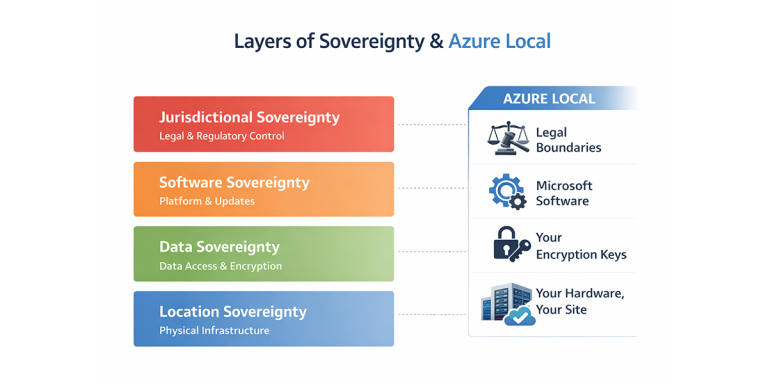
Azure Local is a cluster of validated hardware in your own datacenter, running Microsoft’s virtualization and storage stack, managed from Azure through Azure Arc. You run virtual machines and AKS containers on it, updates arrive as one validated package, and storage is encrypted with keys only you hold. It connects to Azure for management and the services you choose, while your workloads and data stay on your hardware. The architecture details are in the blogs below.

See it run before you invest
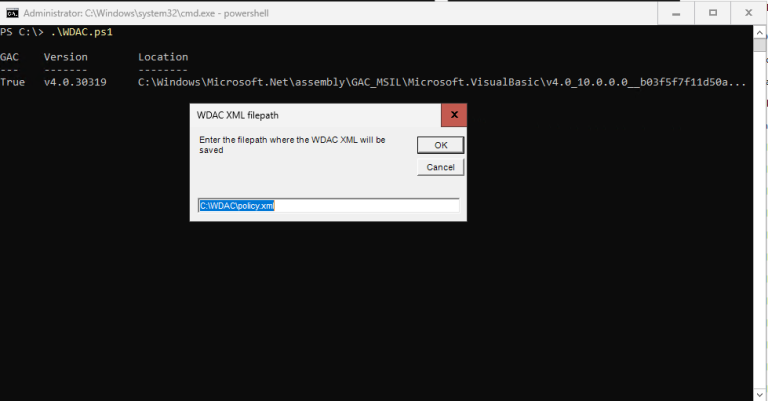
Run a real workload with your own data, in our Technology Experience Center or on your own site. Seeing it work beats any presentation.

What is Azure Local, and is it the same as Azure Stack HCI?
Azure Local is Microsoft's platform for running Azure services on your own hardware: virtual machines, containers and selected Azure services, managed from Azure. It's the successor to Azure Stack HCI. Microsoft renamed the product to Azure Local at the end of 2024 and has added capabilities since. We've worked with the platform since it was still called Azure Stack HCI, and two of our specialists are Microsoft MVPs.

Does Azure Local need a permanent internet connection?
No. If the connection drops, your servers and virtual machines keep running normally. Azure Local does need to sync with Azure at least once every 30 days; if it doesn't, existing VMs keep running but you can't create new ones until it syncs again. For sites that can never connect, there's a fully disconnected option.
How is Azure Local licensed, and what does it cost?
Azure Local is billed per physical processor core per month, through your Azure subscription, with no minimum term. Guest operating systems such as Windows Server are licensed separately, through Azure or with licenses you already own. If you have Windows Server Datacenter licenses with active Software Assurance, Azure Hybrid Benefit waives the Azure Local host fee and covers your Windows Server guest VMs. Microsoft publishes the current rates on its Azure Local pricing page.
Which hardware does Azure Local run on?
Azure Local runs on standard servers from vendors such as Dell, HPE and Lenovo, as long as the configuration is in Microsoft's Azure Local catalog. The catalog lists validated nodes and complete systems per vendor. We've designed and built many Azure Local clusters on hardware from these partners, so we help you choose a configuration that fits your workloads and budget.
How do we move our VMware VMs to Azure Local?
We use migration software that copies your VMs to Azure Local while they keep running, then switches over in a short cutover. Depending on your environment that's Veeam or Microsoft's own migration tooling. We've done this many times with both Veeam and Azure Migrate, and applications don't need to be reinstalled.
Can we replace VMware with Azure Local?
Yes. Azure Local runs the same kind of workloads as vSphere: Windows and Linux virtual machines, plus containers with AKS. Your VMware VMs move across without reinstalling applications, and you manage the new platform from Azure instead of vCenter. It replaces both the hypervisor and the VMware licenses. It's one of the projects we do most often.
Can we manage several locations from one place?
Yes. Every Azure Local instance shows up in the Azure portal, so you manage all your sites from one place with the same policies, updates and monitoring. That's how organizations with many factories or branches run local infrastructure without IT staff on every site.
How does Azure Local compare with VMware Cloud Foundation?
Both run virtual machines on your own hardware, but they come from different directions. VMware Cloud Foundation is a private cloud stack you run and manage on-premises. Azure Local is part of Azure: you manage it from the Azure portal and can add Azure services such as AKS, Azure Virtual Desktop and Azure Monitor. If you already use Azure, Azure Local extends that model to your own datacenter instead of adding a second one.
Can we use Infrastructure as Code on Azure Local?
Yes. Azure Local is managed through Azure Resource Manager, so you deploy and configure it with the same Bicep, ARM or Terraform templates you use in Azure. We set up new environments as code, which makes them repeatable and auditable, and your team can run changes through its existing pipelines. We've built Azure Local as code for years and share our templates and lessons on our blog.
Other products




Other solutions

Sovereign cloud
Control over where your data lives, provable to auditors, NIS2 regulators, and your board.

Datacenter modernization
Hardware up for renewal and VMware costs climbing? Modernize instead of renewing the same setup.

Artificial Intelligence
Run AI on GPUs inside your own datacenter, so your data stays where you put it.
Hybrid cloud
Put every workload where it fits, and manage local and cloud from one place.
Navigation
Important links
Contact details
Socials

