
Azure Local & WDAC
Explains Windows Defender Application Control on Azure Local and shares a PowerShell script to create custom WDAC policies.

Windows Defender Application Control (WDAC) is a software-based security layer that reduces attack surface by enforcing an explicit list of software that is allowed to run. WDAC is enabled by default on Azure Local and limits the applications and the code that you can run on the core platform.
An Application Control Policy has blocked this file
When running software that is not known or signed by Microsoft you can get the error message: "An Application Control Policy has blocked this file".
Microsoft describes in their documentation how you can create your own WDAC policies here so that you can allow 3rd party software on your nodes.
For simplicity sake, we've created a PowerShell script that helps you create additional policies.
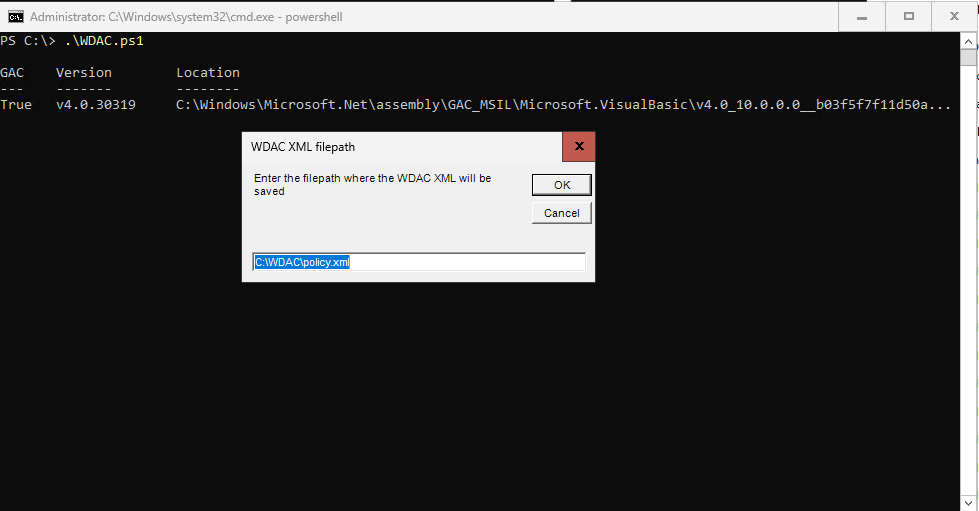
The PowerShell script
It will go through the following steps:
- Ask where to store the WDAC XML policy file
- Ask what directory to scan for software
- Ask information on the policy
- Set policy metadata in the XML
- Check if there is already an existing policy with the same name, with the option to remove it
- Add the policy as 'SupplementalPolicy'
Find the script below, save it to a .ps1 file and run it on an Azure Local node.
$PolicyFilePath = [Microsoft.VisualBasic.Interaction]::InputBox("Enter the filepath where the WDAC XML will be saved", "WDAC XML filepath", "C:\WDAC\policy.xml")

if ($PolicyFilePath -notmatch ".xml"){Write-Error "filepath must end with .xml" -ErrorAction Stop}

$FilesPath = [Microsoft.VisualBasic.Interaction]::InputBox("Enter the filepath where applications are places that will be scanned", "Software filepath", "C:\Software")

$policyVersion = [Microsoft.VisualBasic.Interaction]::InputBox("Enter the version of your policy", "Policy version", "1.0.0.0")

$policyName = [Microsoft.VisualBasic.Interaction]::InputBox("Enter the name of your policy. (no spaces)", "Policy name", "CustomPolicy")

$policyID = "$policyName"+"_"+"$policyVersion"

# Create new policy by scanning directory
Write-Output "Creating new policy by scanning directory $FilesPath"
New-CIPolicy -MultiplePolicyFormat -Level Publisher -FilePath $PolicyFilePath -UserPEs -Fallback Hash -ScanPath $FilesPath -ErrorAction Stop

if (!(Test-Path $PolicyFilePath)) {
    Write-Error "$PolicyFilePath not created, did you provide a correct and existing path?" -ErrorAction Stop
}

# Output results
[xml]$policyxml = Get-Content -Path $PolicyFilePath
$signers = $policyxml.SiPolicy.Signers.Signer.CertPublisher.Value

# Set Policy Version (VersionEx in the XML file)
Set-CIPolicyVersion -FilePath $PolicyFilePath -Version $policyVersion

# Set Policy Info (PolicyName, PolicyID in the XML file)
Set-CIPolicyIdInfo -FilePath $PolicyFilePath -PolicyID $policyID -PolicyName $policyName

# Validate existing policy with same name
$existingPolicyCount = (Get-ASLocalWDACPolicyInfo | where {$_.policyname -eq $policyName}).count
If ($existingPolicyCount -gt 1){
    $remove = [System.Windows.Forms.MessageBox]::Show("$policyName already exists $existingPolicyCount times. Do you want to remove all?","$policyName already exists", "YesNo" , "Warning" , "Button1")
    if ($remove -eq "Yes"){
        $policiesToRemove = (Get-ASLocalWDACPolicyInfo | where {$_.policyname -eq $policyName})
        Foreach ($policiyToRemove in $policiesToRemove) {
            Write-Output "Removing policy with Guid $($policiyToRemove.policyguid)"
            remove-ASWDACSupplementalPolicy -PolicyGuid $policiyToRemove.policyguid
        }
    }
    [System.Windows.Forms.MessageBox]::Show("Policies removed. Removing policies will take effect after you restart.","Restart required", "OK" , "Info" , "Button1")
}

# Add new policy
Add-ASWDACSupplementalPolicy -Path $PolicyFilePath
Write-Output "Policy created with signers: $signers
If you have any questions, reach out!
Let’s talk it through
One conversation is usually enough to see where the value is for your organization, whether that’s in cost, risk, or everyday management. No slides required.

Related blogposts





Navigation
Important links
Contact details
Socials

