
Windows Data Deduplication vs ReFS Deduplication
Explains what changed now that Windows Server 2025 splits deduplication into separate Windows Data Deduplication and ReFS Deduplication features.

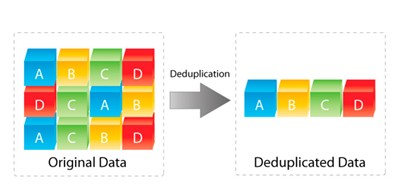
Data growth nowadays is relentless. Whether in enterprise file shares, virtualized environments, or backup repositories, organizations face ever-increasing storage growth. One of the most effective ways to optimize storage usage is deduplication. In short deduplication is a process that eliminates duplicate copies of data and stores only unique chunks.
Microsoft introduced Data Deduplication in Windows Server a long time ago (2012) to help reduce storage footprint on volumes. More recently (2019), deduplication support has also arrived for ReFS (Resilient File System), which is especially useful in hyperconverged infrastructure solutions with Hyper-V or Azure Local. With Windows Server 2025, Microsoft has expanded its storage optimization capabilities. ReFS deduplication has been added as a second feature next to the long-standing Windows Data Deduplication, and it comes with significant enhancements.
What is Data Deduplication?
Deduplication works by analyzing data at the block level, detecting identical chunks, and ensuring they are stored only once. For example:
- Without deduplication: Ten identical 10 GB VHD files will consume 100 GB of disk space.
- With deduplication: Only one copy of the VHD is stored, and the remaining nine references point to it, consuming little additional space.
Depending on what type of data is stored the result is significant savings, especially for scenarios like:
- Virtualized workloads
- Backup repositories
- File servers with redundant content
More details are in Microsoft's documentation on deduplication
What has changed?
Since Windows Server 2025 the deduplication feature has been split up into 2 deduplication features, “Windows data Deduplication” and “ReFS Deduplication”. In this blog post we will show the difference, because if you don’t pay attention you might configure the “old” dedup config, while you wanted the new one.
Data Deduplication in Windows Server “old way”.
Data Deduplication has been available since Windows Server 2012. It’s applied at the volume level and is managed with the Set-Dedup* and related cmdlets.
For example, enable Cmdlet for Deduplication on a Windows Server 2025 host:
Enable-DedupVolume -Volume D: -UsageType DefaultAltering or creating jobs is done with the Set-DedupSchedule commands:
Set-DedupSchedule -Name "BackgroundOptimization" -Type Optimization -Start 09:00 -DurationHours 6 -Days Monday,Wednesday,FridayAnd of course, there are more of these commands available to give fine-grained control over how and when deduplication is applied to volumes.
Data Deduplication the new way
ReFS is Microsoft’s modern file system designed for resiliency and scalability. While it lacked deduplication support initially, Windows Server 2019 introduced ReFS block cloning and deduplication. With the latest update in Windows Server 2025, deduplication on ReFS is completely rebuilt, making it possible to achieve storage savings for high performance workloads such as Hyper-V virtual machine storage.
With the previously mentioned Set-Dedup* commands you could enable dedup on ReFS volumes, however you will miss out on the new improvements specifically made for REFS. The new deduplication features are enabled and managed with Set-ReFsDedup* cmdlets.
For example, enable ReFS Deduplication on a volume with:
Set-ReFsDedupVolume -Volume C:\ClusterStorage\Volume01 -Enabled $trueThere are also options to exclude certain files from deduplication:
Set-ReFsDedupFileMetadata -Path "C:\ClusterStorage\Volume01\VMs\Template.vhdx" -ExcludeFromDeduplication $trueOr trigger optimization with:
Start-ReFsDedupJob -Volume C:\ClusterStorage\Volume01See the difference?
Conclusion
Windows Server offers two flavors of deduplication: the Windows Server Data Deduplication, and the newest ReFS Deduplication. ReFS deduplication is designed for active and high-performance workloads, focusing on minimizing performance impact after optimization.
- ReFS deduplication doesn't use a chunk store to store deduped data, and there's no physical data movement involved. The feature relies on ReFS block cloning to enable metadata-only operations.
- ReFS deduplication also has the compression option to reduce the storage footprint even further.
- Multiple modes to operate in: deduplication only, compression only, and deduplication and compression.
- Incremental deduplication deduplicates only new or changed data as opposed to scanning the entire volume every time, optimizing job duration and reducing impact on system performance.
Windows Data Deduplication might provide better storage savings due to its use of variable block sizes, it's also suitable for a broader range of workload types, such as General-purpose file servers (GPFS), backup targets, and more. Due to known issues from our field deployments we do not recommend using Windows Data Deduplication on Hyperconverged infrastructure solutions.
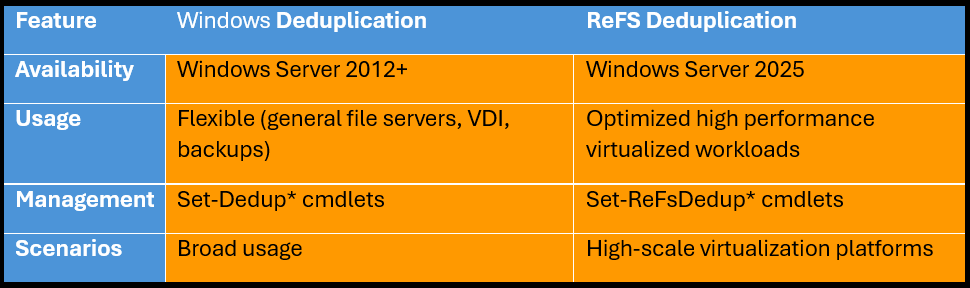
One BIG tip, do not enable them both because that is not supported!
Let’s talk it through
One conversation is usually enough to see where the value is for your organization, whether that’s in cost, risk, or everyday management. No slides required.

Related blogposts






Navigation
Important links
Contact details
Socials

